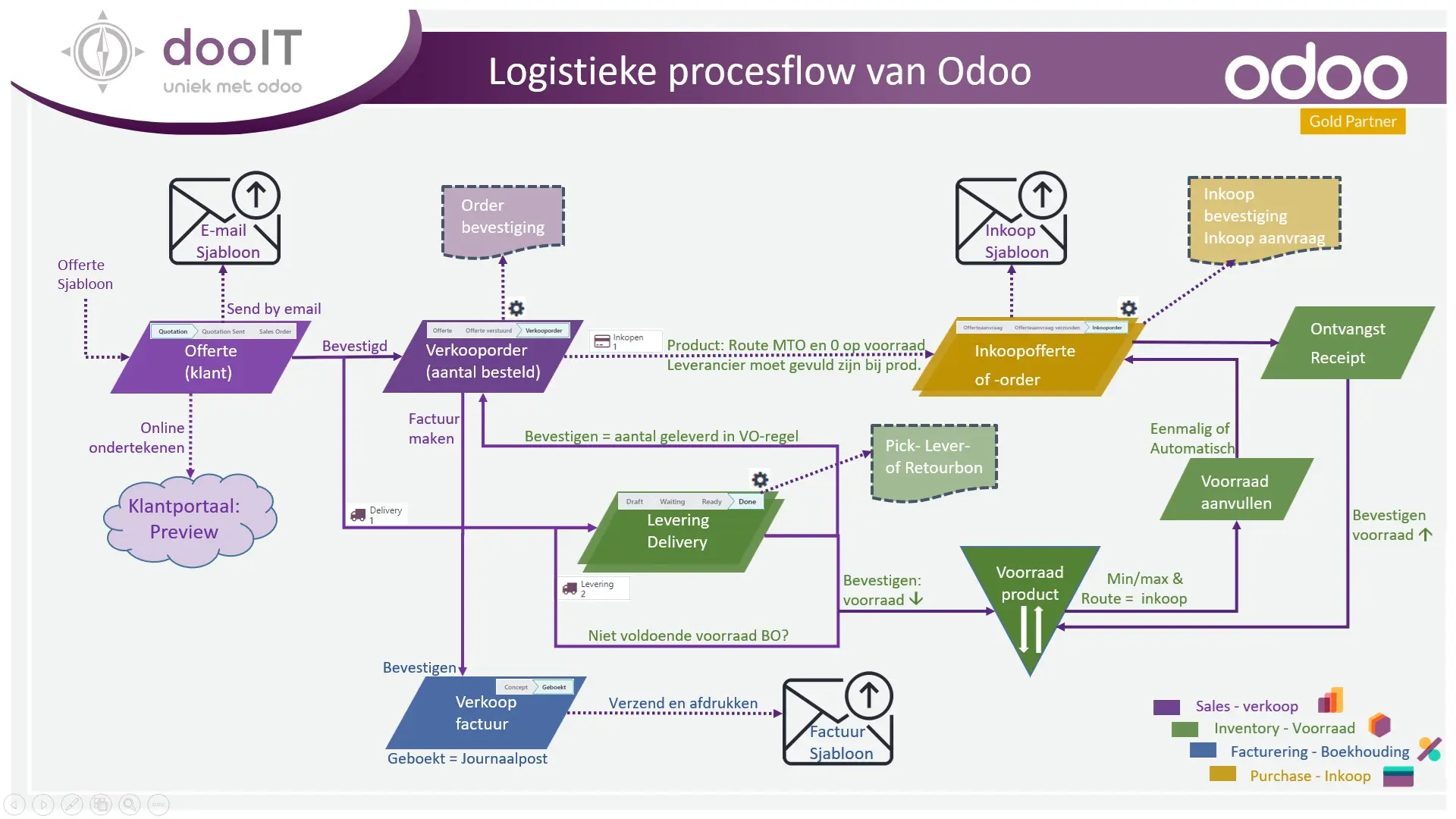
In Odoo, the logistics process from the sales quote to delivery, purchasing, and invoicing proceeds as follows:
1. Sales Quotation
The process begins with creating a sales quote in the sales app. You can work with Quote templates which makes it even faster and easier to send a professional quote, also by using AI. The customer receives a quote that, after approval (possibly via Customer Portal), is converted into a sales order. See also video about the Sales App.
2. Sales Order
The sales order activates the logistics process. Depending on the inventory status, products are reserved and a delivery is created or a purchase order is generated for non-stock items. This can proceed via the “Replenishment order lines (min/max) that are recorded with the product or via a MTO route (order purchase).
3. Purchase order:
If the required products are not in stock, Odoo automatically generates a purchase order to the correct (preferred) supplier. This is managed through the purchasing module, where you register the receipt of goods as soon as they arrive. The inventory then increases. See also video about stock replenishments.
4. Warehouse Management and Delivery
After the stock is replenished, the products are prepared for shipment in the warehouse. The warehouse module coordinates the pick, pack, and ship processes. Once the products are shipped, the delivery is confirmed in Odoo and the stock decreases again. . See also video about warehouse processes, delivery & receipts.
5.Invoicing:
After delivery, an invoice is generated from the sales order or directly from the delivery (via an automated action). This is automatically sent to the customer and can be tracked in the accounting module until payment is received.
This process ensures an automated and integrated workflow, in which sales, purchasing, warehouse management, and accounting work seamlessly together. See also video about invoicing.
Would you like to know more about Intercompany transactions?
Would you like to know more about the returns (RMA) process?