
How to Choose the Best Odoo Hosting Option?
There are 2 versions of Odoo:
a. Odoo Community (which does not include, for example, the accounting app)
b. Odoo Enterprise (which includes all 65 standard Odoo apps)
Within Odoo Enterprise, there are 3 variants: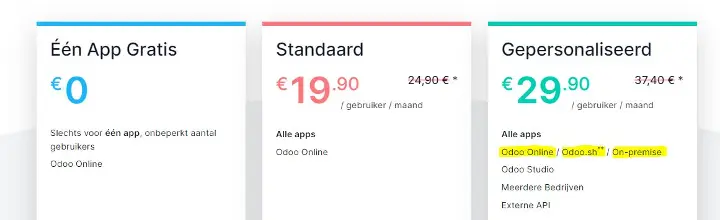
The Odoo Customized Variant (Green, also known as Custom) can be hosted in 3 ways:
1. Odoo Online (shared hosting)
2, Odoo.sh (dedicated hosting)
3. On-premises (self-hosted)
Ad 1. Odoo Online - the Easiest Solution
Odoo Online is a SaaS (Software as a Service) solution. With just a few clicks, your Odoo is set up and ready to use. Odoo Online comes with a pre-configured email server (note: a maximum of 20 or 200 emails per day, for more: connect your own mail server)! !
The biggest advantage of Odoo Online is the convenience, as Odoo takes care of everything for you. Odoo monitors the platform 24/7 to ensure that Odoo always performs well. If your business grows, Odoo scales with you. Of course, backups are well managed and bug fixes and security updates are automatically implemented.
Every day, Odoo makes a complete backup of your database(s) and they are replicated in at least 3 different locations on different continents. From your own database control center, you can download all your backups from the past 3 months. You can also easily duplicate your production database for a temporary test environment, which is handy for testing new functionalities. Odoo Online has a Cloud Service Level Agreement. Odoo guarantees an uptime of 99.9% (excluding scheduled maintenance).
Note: on Odoo Online, you can only install the Odoo standard apps (there are many: at least 65) and no third-party apps or custom solutions (except Studio). Standard apps are the apps developed, maintained, and upgraded by Odoo SA. Minor adjustments, such as modifying screens or reports, are possible by using Odoo Studio.
The price includes the upgrade by Odoo SA itself to the latest Odoo version.
Ad. 2. Odoo.sh - The best of both other worlds (shared vs on premise)
Odoo.sh is een PaaS (Platform as a Service) beheerd door Odoo SA. Met Odoo.sh kun je met een paar klikken je eigen cloud-platform implementeren. Ook wordt Odoo.sh geleverd met een e-mailserver (let weer op maximaal 200 per dag), maar je kunt ook gebruikmaken van je eigen e-mail server.
Odoo.sh is designed to easily install all standard Odoo apps, as well as all third-party apps available from the Odoo app store. Additionally, you will find built-in tools that allow you to develop and test new apps and custom features, such as:
- Integration with GitHub
- An online editor
- Continue integration
- Your own DTAP environment (DTAP = Development, Testing, Acceptance, and Production)
- Version control (track, fork, merge, etc ...)
- Automated testing of every new commit
- And more
The platform is managed by Odoo SA, and Odoo SA guarantees the same Service Level Agreement as for Odoo Online: 99.9% uptime. Odoo also makes a full incremental backup of your production environment every day. These backups are stored in 3 different data centers on different continents, allowing you to download all backups from the past 3 months.
Odoo.sh geeft je de flexibiliteit om de beste implementatiearchitectuur te kiezen (aantal werknemers, opslag en aantal testomgevingen) en je kunt de configuratie eenvoudig aanpassen aan wat je nodig hebt. Je kunt het platform schalen naarmate je bedrijf groter wordt!
Het platform bied je het beste van twee werelden. Het gebruiks- en onderhoudsgemak van Odoo Online gecombineerd met de vrijheid van Odoo On-Premises.
Ad. 3. Odoo On-Premises - de uitdagendste
Odoo Enterprise can be installed on your own server.When you use Odoo On-Premises, you have full control and autonomy over your installation. Therefore, you can use all the apps available and also implement your own customizations. Installing Odoo is complex, do it together with dooIT.
We recommend installing Odoo on your own server if you have special requirements regarding security, scalability, performance, or integrations. When using the API on Odoo Online or Odoo.sh, you may experience performance limits that you cannot influence. A dedicated server may then be the best solution.
With your own server, the possibilities are of course endless, but be aware: you really need a lot of technical knowledge about setting up a good infrastructure. Think for example of:
- Setting up an OTAP environment
- Number of servers in a cluster
- Updates of Odoo
- Installing a reverse proxy
- Connecting email servers and domains
- Installing SSL certificate
- Making backups
- Tuning the PostgreSQL database
- etc.
Our advice is therefore to choose this only if you have good, solid, up-to-date technical knowledge in-house. dooIT can help with installation, but managing an on-premise Odoo environment is not part of our wishes.