
What’s new in Odoo 20?
On September 24, 2026, Odoo released version 20 during Odoo Experience in Brussels. We delved into the release notes and the source code of the new version. The latter is especially important this year, as the official release notes cover dozens of countries, but the Netherlands is not included. Therefore, we found the changes that are most interesting for Dutch administrations ourselves in the code.
Four lines stand out in this release:
- Odoo keeps you moving. The web client continues working without an internet connection, a scale or label printer no longer needs an IoT box, and a production order no longer waits for the previous step.
- AI is everywhere, and Odoo provides the interface itself. From a standalone AI app to AI in every app, plus a built-in MCP server that allows external AI assistants to communicate directly with Odoo.
- Fewer loose modules. Batch picking, the wishlist, remote work, the organizational chart, IBAN validation: it’s all included, with a switch in the settings.
- More control over what is fixed. A control status on bookings, draft and booked status on bank statements, signatures that only appear on the correct document version, and approval rules that cannot be bypassed.
Below are the updates for each component, with an emphasis on what you will notice in daily practice. At the bottom, you will find our upgrade checklist.
1. General & user experience
Odoo continues to work if the connection is lost
The biggest change for everyone using Odoo on-site: Odoo 20 can now function without an internet connection. If the connection drops, you'll see it in the system tray and a Working Offline menu will appear with everything that hasn't been sent yet. Form, list, and kanban views continue to work, you can create, modify, and even delete records, and as soon as the connection is restored, everything is automatically synchronized. Searching also works offline. .
Honestly, it relies on what is in the local cache. A record type that you have never opened or created online is not available offline, and for now, this applies to the common field types (text, numbers, amounts, dates). Not yet for relationship fields. But for the warehouse, the technician at the customer, or the basement of a building, this means: the work no longer comes to a halt.
A fresh interface, also on mobile
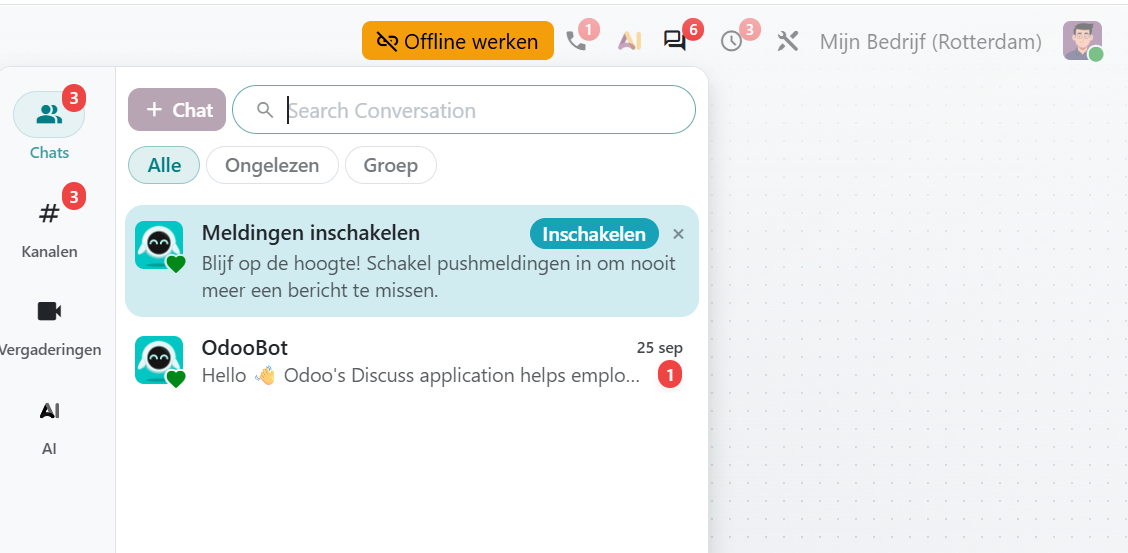
The web client has been redesigned: new icons throughout the application, calmer forms, pill-shaped search bars, and revised notifications and dialogs. Colors now come from a single central palette, ensuring the dark mode works consistently everywhere, including in charts and dashboards. Additionally, the dark mode automatically follows your device settings; therefore, the quick switch has been moved to your preferences.
For phone and tablet, separate work has been done: bottom sheets instead of dialogs, pull-to-refresh, a back button that does what you expect, and a custom mobile layout for things like order lines and accounting. Do expect a bit of an adjustment: buttons and icons are in different places than you're used to.
Small things with a big daily impact
- Dot or comma, both are fine. A decimal number can now be entered with either a dot or a comma, regardless of your language setting. Small, but noticeable daily in the Netherlands on the numeric keypad.
- Switching VAT inclusive or exclusive on sales orders, purchase orders, and invoices.
- Share a view as a link, including the filters, search query, and grouping you are using at that moment.
- Assign activities to a role instead of a single person. Work for "someone from the team" no longer gets stuck with a colleague who is absent or has left the company — one of the most underestimated improvements of this release. Activities now also have a pivot table and chart view, so you can see how many follow-up actions are open and with whom.
- Contacts in hierarchical view, useful for corporate structures and many contacts per relationship.
- Drag multiple records at once in list and kanban, and stacked fields in list columns.
Spreadsheets: finally shareable externally
You can now share an Odoo spreadsheet publicly so that external parties can collaborate with editing rights. This was exactly the hurdle where Odoo Spreadsheet often failed in practice: sharing a budget with your accountant was simply not possible. However, be aware that public sharing should be a deliberate choice. Who can share and what is shared is something to be defined. Also nice: spreadsheets now support dark mode, and a side panel shows unused pivot tables and lists so you can clean up cluttered spreadsheets.
Documents: sharing in groups and deep searching
Documents and folders can be shared with a user group instead of individual persons. Rights management that adapts to employee turnover. And searching within a folder now also searches in the underlying folders. New is the connection with projects: an attachment in the chatter of a task automatically becomes a document that refers back to that task.
Discuss: polls and announcement channels
In a channel, you can set up a poll, and a channel can be set to read-only for announcements. Participants then respond with emojis or in a sub-thread. Portal users (your customers) can now access their conversations directly from the customer portal.
2. AI in Odoo 20
From an AI app to AI in every app
Odoo 19 had a central AI app with a handful of integrations. In Odoo 20, that picture has changed: the number of AI modules grows from 15 to 51, and the standalone AI app has disappeared. AI is no longer a separate destination but is integrated into the screens where you already work: sales, purchasing, inventory, projects, marketing, documents, helpdesk. Agents show live what they are doing, and you respond to questions or suggestions with a button instead of text.
Agents can also take real actions: create and update records (including in batches), control screens, deploy sub-agents, and respond to events — for example, automatically start working as soon as an invoice arrives. What was called a "topic" in Odoo 19 is now referred to as a skill.
Odoo includes its own MCP server
For integrations, this is the most important change of the entire release, although Odoo summarizes it in one line (“Connect Odoo to anything”): Odoo 20 Enterprise includes a built-in MCP server.
What is MCP? Full name Model Context Protocol. Think of it as a universal plug between AI assistants and your software. An AI assistant like Claude or ChatGPT is inherently a closed conversation partner: it cannot look into your systems and certainly cannot do anything in them. MCP is the open standard that changes that. Connect a system via MCP, and the assistant can, within the limits you set, retrieve data and perform tasks. Previously, each system required its own integration; with MCP, it’s one standard plug that every modern AI assistant understands.
That Odoo now provides the server itself means concretely: your Odoo environment can be a directly connected system, without an external intermediary. Ask your AI assistant which invoices for a customer are still outstanding, have it prepare a draft quote or compile a report. And it does this using your actual Odoo data, not based on what you happen to tell it.
Access is managed through an API key with its own limited scope, and for each server action, you decide whether it is available as a tool and whether it can be read-only. This shifts the question from "can it?" to "what do you allow an AI assistant to do independently in administration?" — and that is exactly the conversation we would like to have with you. We have been experimenting with MCP integrations on Odoo for some time and are happy to help you set this up securely.
AI as a second pair of eyes on the accounting
A new module for AI-assisted auditing of financial reports has been introduced with a unique setup: not just one agent making a judgment, but two. An Auditor agent examines a checkpoint, and an Audit Reviewer agent independently assesses the evidence and conclusion before you see anything. This aligns with the new audit workflow on bookings (see below): the agent conducts an initial round, while the human remains ultimately responsible. That's how we believe it should be.
Good to know: credit and model choice
The AI features work with credits that you purchase via In-App Purchase. Regarding the models: you choose the AI provider, and Odoo automatically selects the appropriate model for each task. Standard prompts are customizable, and an agent who reaches their action limit will first ask for confirmation. For organizations with their own AI policy, it's relevant to know that you direct the provider, not the model per task. Responses from an agent based on your own documents will now include a clickable source reference to the correct record, so "where did you get that from?" can always be answered.
Further spread throughout the application: dictating in the AI chat, conversation summaries of phone calls with transcription, generating AI images from the editor, translating an entire webpage at once, automatically renaming documents, and setting up a marketing campaign by describing it in plain language.
Accounting & Finance
For the Netherlands: the supplementary declaration is in Odoo
This is the most important point of the release for Dutch administrations — and you read it here and not in the Odoo release notes, because the Netherlands is not included this year. Odoo 20 introduces a new tax return type for the corrective VAT return (supplementary). You create this manually to correct a previous return for the same period, with your own report templates, and it follows the existing SBR route. Submitting a supplementary return was previously done outside of Odoo; this is now coming to an end.
More Dutch news from the code:
- There is a separate field for the VAT number on contacts and companies, separate from the VAT identification number — a recurring source of confusion in the declaration practice is thereby resolved.
- The Digipoort endpoints have been updated to the change of May 1, 2026, and the SBR and ICP declarations will now go through Odoo's secure proxy, with Odoo's own certificate. An own PKI government certificate is no longer needed to file directly from Odoo. Exactly the threshold that has held back many organizations until now.
- Types of declarations and reports can be enabled and disabled per company — convenient for multiple entities .
Control workflow on bookings: the four-eyes principle
Journal entries receive a real control status field: no control, to do, deviation, checked, and approved. Who can set which status depends on user rights—an employee cannot check off their own work. For administrative offices and organizations with a separation between input and control, this saves custom work and separate work agreements.
Reconciliation: the greatest time saver
When importing a bank statement, Odoo will now automatically reconcile, large files go to a background task so that the import does not hang. Surrounding this: new matching rules, an adjustable payment tolerance, analytical distribution directly at reconciliation, and splitting journal entries from the reconciliation screen. Bank statements also have a draft and booked status, so manually entered statements can first be completed calmly. With the audit trail preserved in secure logs.
Pay from the invoice
Setting up a payment with your bank was only possible from a batch payment; now it can be done directly from a purchase invoice or payment via payment initiation (PISP) on your bank connection. The process has become more mature: the bank returns the status, the payment limit is checked in advance, and sent batches can no longer be deleted. We would be happy to help you find out if your bank supports payment initiation.
Peppol and e-invoicing
E-invoicing is gradually becoming mandatory in the EU, and Odoo is making significant progress on this. The setup has been simplified, identification during registration can now also be done via itsme or manual verification, and status notifications (received, rejected) are included by default. The most practical aspect: if a supplier has “automatic booking” enabled, invoices received via Peppol will actually be booked automatically instead of remaining in draft. Documents sent or received via Peppol are also protected against deletion.
Updated dashboard and daily work
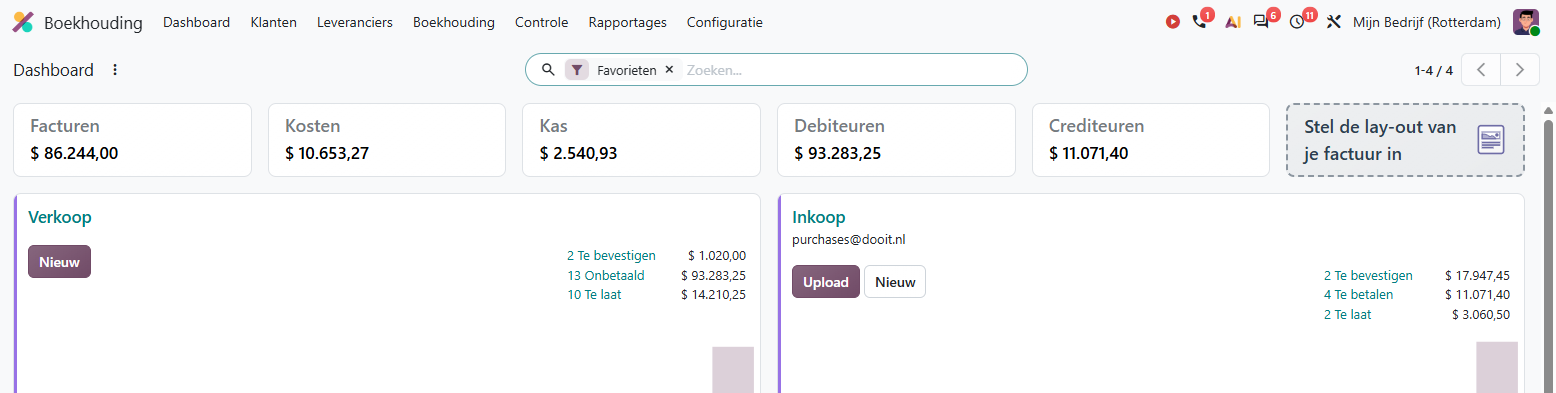
The accounting dashboard has been revised, with KPI cards for invoices, expenses, cash, accounts receivable, and accounts payable, a card for setting up your invoice layout, and unprocessed bank statements that count as KPIs. The tablet and phone display has also been separately addressed.
Further in daily work:
- Rule prediction on purchase invoices: Odoo suggests product, general ledger account, VAT, and analytical distribution based on history. What you enter yourself remains unchanged.
- Duplicate invoices are flagged at two levels: red for almost certainly duplicate, yellow for “let's take a look first.” Duplicate payments are also recognized and reconciled in the payment wizard.
- Fixed assets: depreciation based on percentage alongside duration, decimal durations (27.5 years is now possible), and activating a non-depreciating asset.
- A new report cash flow analysis based on actual bank transactions, and a report for bank balance reconciliation.
- Bulk editing of relationships and journals on bookings, downloading attachments of multiple invoices as a zip, and exchange rate differences consolidated into one line per invoice.
- For offices: the audit report is now called the annual report and can be duplicated with your own branding. The industry package for accounting firms has also been expanded to include identity document management and anti-money laundering support (AML) — relevant for the Wwft practice; we would be happy to explore with you if it aligns.
4. Sales, CRM & subscriptions
Tracking inventory without the Inventory app
One of the most practical changes in this release: the stock quantity is now displayed on the product itself. Those who do not need receipts, deliveries, and validation steps can still keep track of stock levels. The value is simply debited and credited during sales, purchases, and cash sales, including an availability indicator on the order line. Until now, it was all or nothing.
One order overview with dashboard
The separate menu entries for quotes and orders have been combined into a single list, with a compact dashboard above: three quick filters (to be confirmed, to be delivered, to be invoiced) and a period filter on the right with the number of orders and the revenue. Fewer clicks, immediate overview — although it takes some getting used to as familiar menus disappear.
Documenting additional work on an ongoing order
New on the sales order: a Services & Materials display where you can directly record additional services or consumed materials. Odoo turns these into analytical entries and automatically updates the order — when charging at cost price, a new entry is added; when charging at sales price, the existing entry is increased. Exactly the missing piece for installation, maintenance, and project companies.
Quoting and signing
Quote templates are maturing: reusable section templates, creating a template from an existing order, and the product configurator that also works within templates. Sections and subsections on quotes and invoices received quantities per section and a neater display on the PDF.
Important for evidentiary value: the digital signature only appears on the PDF as it looked at the time of signing — an offer that is later modified no longer appears falsely signed. In the Sign app, multiple signatures can now be added to one document, you can send a signature request via WhatsApp, and — very practical — what the signer fills in (such as an IBAN or Chamber of Commerce number) can automatically flow back into the record in Odoo.
Orders, prices, and payments
- An order with a leftover that will never be invoiced can now be manually closed (and reopened) — the missing cleanup button.
- Orders confirm in bulk and edit in mass from the list.
- The promised delivery date and delivery status are in the header of the order, with the percentage delivered next to it.
- New payment options: paying on invoice as a neat route in the ordering process, a fixed amount as a deposit next to a percentage, and split payments.
- Prices per period or weekday: price list items (including surcharges) can apply to specific periods or days — weekend and seasonal rates without customization.
Projects and CRM
The interface between sales and projects has significantly expanded: generating a project from a CRM opportunity, margin overviews per project, automatic milestones, and project templates as a full-fledged component — including project roles, so tasks are assigned to a role and you only need to choose people belonging to that role during rollout. Projects that remain in the same phase for too long are highlighted in the display; it's usually not the busy project that goes wrong, but the one that no one pays attention to anymore.
Collaborating with customers on a project has also become predictable: an external user sees the entire board, access is no longer tied to following tasks, and per access level it is determined which fields someone is allowed to edit. There is also a read-only level added. In CRM finally: a team selector in My pipeline, and the pipeline works offline.
Subscriptions
Two features that subscription customers previously tracked separately in a spreadsheet are now included: pro-rata billing when a subscription ends mid-period, and MRR visible on the quote—before the customer signs. Additionally: a configurable number of days for the payment reminder, dates that are neatly reset upon duplication, loyalty programs on subscriptions, and staff planning that schedules services based on the contract—interesting for maintenance contracts.
Please note if you sell via Amazon: the integration has migrated to Amazon's new Orders API; the old version is being phased out. This could be a concrete reason not to delay the upgrade for too long.
5. Inventory, Purchasing & Production
Smarter supplement
Around order points there is a clear line: Odoo calculates order proposals based on actual demand, instead of someone maintaining minimum and maximum values per product. A new wizard sets the base and a percentage factor for multiple order points at once, the replenishment wizard calculates with daily demand, and the proposals appear in the purchasing catalog with an interactive forecast.
Batch picking and the warehouse
Batch picking is no longer a separate module but a switch in the Inventory settings; batches and waves have been merged into one concept. In the barcode app: RFID support, generating lot and serial numbers on-site, and automatically packaging. Labels can be sent directly to an ePOS or ZPL label printer, and a compatible scale now works via the browser (WebSerial, in Chrome and Edge) — without an IoT box. Also new is an age analysis in the inventory valuation report: how long has it been sitting, and what is it still worth.
Multiple entities? The intercompany flows have been addressed.
For customers with multiple companies, this is one of the biggest improvements: routes to supply one company from another, delivering from the warehouse of a sister company, valuation costs that transfer correctly, and price or quantity changes that are automatically communicated to the other side. Also new: if the cost price changes afterwards (for example, due to additional costs or a different invoice price), the value of an already made delivery is updated retroactively.
Production
- Continuous production: the next operation is released as soon as a part is ready, instead of waiting for the entire previous step to be completed. The line no longer stops for administration.
- Planning per employee in addition to planning per workstation, scheduling individual operations, automatically scheduled backorders, and a capacity display for production orders. Useful for workstations where people are the scarce resource, not machines.
- Labor costs are automatically booked at real-time valuation, so the cost price is accurate without rebookings.
- The master production schedule (MPS) makes proposals for multiple products simultaneously and received a category filter — making it manageable even for a handful of products.
- Maintenance: multiple executors per notification, teams with their own phases, and a Gantt schedule for maintenance.
Procurement and Quality
Comparing alternative purchase quotes has become its own feature with a switch in the settings — no longer hidden in the purchase agreements. Supplier price lists can be per product variant and in the supplier's currency, and the last order line can serve as the supplier price. From now on, during quality control: a delivery will not be validated until the inspection is complete (an administrator can deliberately skip), and there is reporting on the quality score per supplier.
6. Website, e-commerce & marketing
The webshop
The wishlist and product comparison are now simply included in the webshop module. The search function has become more tolerant. Visitors who just use a different word can still find the product. Under the hood, significant work has been done on findability: structured data (schema.org) for richer search results in Google, a cleaner sitemap, and better multilingual SEO. Furthermore: delivery costs of all your carriers at once requested when choosing a delivery method, and loyalty points that can finally expire. The reason why many webshops overlooked Odoo’s loyalty program.
Website builder and email marketing
Odoo has long been able to import an existing website: specify the URL, and Odoo rebuilds the site using its own building blocks. Those who tried this in earlier versions know that the result was mainly a static starting point. In Odoo 20, that import has already improved: it builds with the renewed building blocks of version 20, in addition to WordPress blogs, now also Ghost-blogs are included, alongside Shopify and WooCommerce, PrestaShop has been added as a recognized webshop platform, and for imported products, redirects are automatically created. So that old product links and your search traffic survive a domain transition.
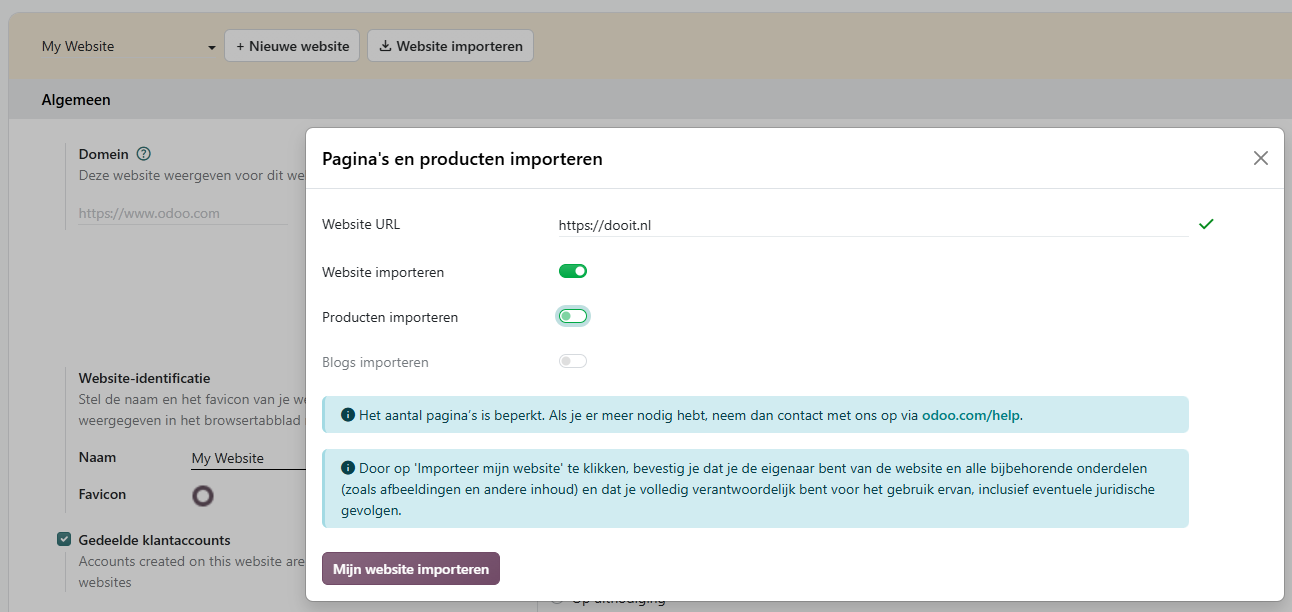
The real difference lies in Odoo 20 alongside: the new website agent. It uses your existing site as a reference and then really gets to work. It builds pages from existing Odoo building blocks (no loose, uneditable HTML), adds missing pages and sections, and applies your house style with one command. Color palette, typography, design language, all at once across the entire site. The setup is also well thought out: a separate control agent evaluates generated content before it lands on a page, and an email address from a transferred contact form is deliberately not quietly taken along.
For the honest expectation: an import remains a starting point, not a migration. You rebuild forms, product and blog import depends on the source platform, and the number of pages is limited. But the combination, the import as a basis, the agent that finishes it, makes “we actually need to renew the website” a significantly smaller project than it has been so far. Curious about what will happen to your current site?We are happy to convert it for you, so you can see the result before you decide anything.
Appointments
Anyone who works with online appointments knows the gap in the schedule: a customer clicks on “reschedule,” drops out, and the old appointment is gone. That has been reversed — the existing appointment remains until a new time is chosen. Canceling has become its own route. New is also an evaluation system for appointments with a feedback email afterwards: appointment, execution, ask how it went, report on it.
7. Cash register
For our customers with a cash register, we highlight three things. First: a compatible scale and receipt printer work directly through the browser (Chrome or Edge), without IoT box — and with the new Obox software, an Android tablet or phone can take over the role of the box. Secondly, a cash session now concludes with one global sales entry instead of separate miscellaneous entries, and the payment entries are automatically created at a set time. Without anyone having to press the button in the evening. This significantly simplifies the administrative aftermath. And thirdly, there is a new, highly restricted access level Supervised for cash staff.
8. HR: personnel, leave, and expense claims
For clarity in advance: Odoo does not have a Dutch payroll localization, so payroll remains with your current package or provider. The surrounding components are indeed very relevant:
- Leave is the most heavily processed HR component: a revised balance dashboard, dragging and adjusting leave in the calendar, negative allocations with an adjustable lower limit, better handling of schedule changes (a classic source of errors), and negative hours are back — Odoo had removed negative overtime in version 19 and calls it a loss for customers; it has been rebuilt.
- Declarations: a reimbursement limit per role, with a warning for the employee and a cap button for the manager. Duplicate declarations are flagged, and OCR input can be manually corrected. Note: approved declarations will now become draft invoices in the declaration journal — the separate "Employee Declarations" menu has been removed.
- Contracts: a real contract type, planning termination in advance, and contract versions under a timeline. Remote workdays, the hourly rate per employee, and the organizational chart are now standard in the personnel module.
- Time registration received a striking new assistant: based on your own computer activity (via the open-source program ActivityWatch), your agenda, and your planning, Odoo suggests time entries, and it learns from your choices. Important to know: the collected data remains on the employee's own computer and only goes to Odoo when they create a time entry from it. It is a tool for the employee, not a monitoring system. However, it applies: activity registration in the workplace touches on privacy and employee representation, so involve your Works Council before rolling this out. We are happy to think along with you.
- The reception desk (visitor registration) received explicit GDPR support and automatic check-out — an argument to now do visitor registration in Odoo.
- Fleet: status bar on vehicle contracts, mileage reporting, a unique license plate enforced, and a link between fleet and maintenance.
9. For developers and administrators
We'll keep it brief here — a separate blog will cover the technical details — but there are three things you need to know:
- Access rights have been simplified: the separate access rules and record rules have been merged into one model (ir.access), with each rule having a model, group, operation, and domain. Clearer for administrators; for customization, an adjustment that we will handle for our clients.
- Paper Muncher, Odoo’s own new PDF engine, is available as an option per report alongside the familiar wkhtmltopdf. A structural solution for the hassle with page breaks and fonts. But wkhtmltopdf is still available.
- Studio received a rebuilt report editor that connects to the website builder, and approval rules can have underlying rules so that the main rule cannot be circumvented. The line between “that can be done in Studio” and “that is customization” shifts a bit again.
For administrators worth mentioning: logging in with passkeys (now also on Android), automatic merging of duplicate contacts with a single adjustable similarity threshold, and a new module that provides insight into your own Odoo subscription, databases, and IAP credit.
10. Industry Packages
Odoo is further expanding the industry packages. New or renewed are packages for catering, interior design, equipment rental (with quarantine on returns and billing based on operating hours), refurbishment of electronics (including the margin scheme for VAT) and public institutions. The hotel packages received housekeeping and the settlement of bar and restaurant bills on the final invoice. For beverage trades and breweries: the deposit and excise modules are now available separately.
One warning: Construction Developer is now called Property Developer and has been rebuilt on standard Odoo production and inventory. For construction clients on this package, the upgrade is a project, not a button.
Upgrading to Odoo 20: What to Consider
Odoo 20 is a release with a lot of content, but also with some changes that affect existing setups. With the arrival of version 20, standard support for Odoo 17 is also discontinued — anyone on that version must take action. This is our checklist:
- The Field Service app no longer exists — the field service functionality has moved to Planning, and it gained many enhancements there: a live map with technicians, route optimization, travel expense invoicing, and tracking customer equipment. However, it remains a move: configuration, reports, and customization do not automatically transfer.
- Manual entries on a bank account are no longer possible — every entry must come from a bank transaction.
- The menu Employee Expense Claims is gone; approved claims become draft invoices.
- Report layouts bold, boxed and striped have been removed, as well as background images on reports. Invoices and quotes that rely on them need to be redesigned.
- Font Awesome has been replaced by Material Symbols — customizations with hardcoded icon names break.
- The VIES VAT check is in a new module; check after the upgrade that it is still enabled.
- Loyalty points are stored differently — check balances of ongoing savings programs.
- SLA agreements in Helpdesk are being converted to a domain filter; check if they still work on the correct tickets after the conversion.
- The findability setting on document folders no longer carries over to underlying files.
- Tracking values have been removed — reports that rely directly on them will now need a separate module.
- The pricing method “percentage” on price lists has been discontinued — review existing price lists.
- Do you sell via Amazon? The API migration makes upgrading urgent.
- The WinBooks import and the Mondial Relay connection have been removed.
- Customization: the merged access rights and various ORM changes mean that customer modules need to be reviewed — we do this as part of every upgrade process.
When to upgrade?
As always, the first weeks after a major release will see stabilization updates. Our advice is to conduct the inventory now. Which of the above points affect your environment, and what does Odoo 20 offer you? And to plan the actual transition.
Curious about what Odoo 20 means for your organization? Contact us for a no-obligation upgrade check. We'll go through your environment together using the checklist and immediately show you which new features — from supplemental tax returns to AI in your daily screens — will benefit you the most.
Or come to our dooIT Customer Day on Thursday, November 19. We will take an in-depth look at Odoo 20
and show what the new possibilities can mean for your business.
Not a customer at dooIT yet?No problem, you are still very welcome.
Registration is mandatory.
Sign up for the dooIT customer day